

HOW TO WRITE A GOOD AI PROMPT?
From a weak instruction to a professional JSON prompt
Artificial intelligence can generate images, video, music and text at an incredible level. The catch is that the quality of the final result depends directly on the quality of the prompt — the instruction we give it.
In this article you will learn:
- What a prompt actually is
- What a bad prompt looks like
- What a good, detailed prompt looks like
- How to build the most powerful version of a prompt in JSON format
What is a prompt?
A prompt is an instruction given to an artificial intelligence that describes what we want the model to generate for us. It can be an image, a video, music, an animation or text.
A prompt works like a brief — the more precise it is, the better the AI understands your vision and the better the final result you get.
The easiest way
The best and fastest way to write a good prompt is… to use another language model, e.g. ChatGPT.
All you have to do is:
- Say that you want to create a really good prompt.
- Ask the model to ask you guiding questions.
The AI will start asking about the scene, characters, mood, emotions, lighting, camera and visual style. By answering these questions, you build the full context step by step, which becomes a strong, polished prompt.
Bad prompt vs good prompt
Bad prompt
"A man walking down the street"
- Too generic
- Defines no style
- No information about emotions, lighting or camera
- The AI has to guess — the result is random

Good prompt
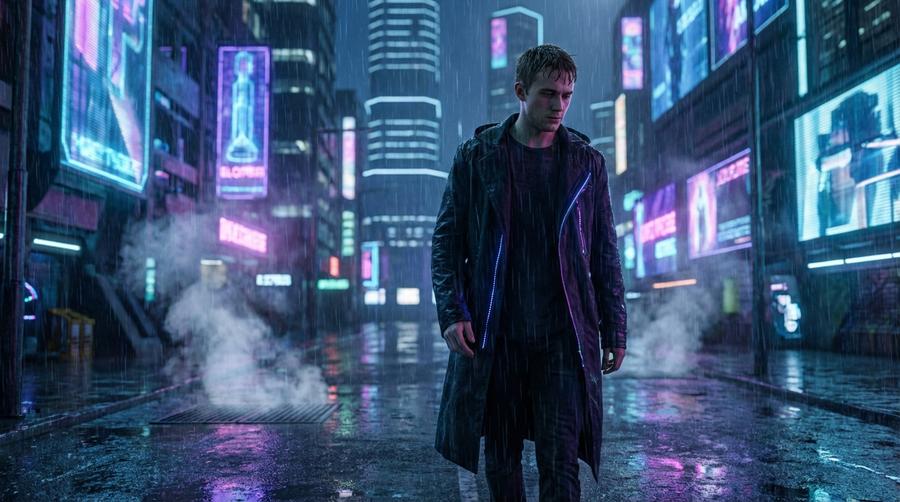
"A young man walking alone at night through a rainy street in a big city, neon lights reflecting in the wet asphalt, cyberpunk mood, cinematic low-angle shot, realistic style, cinematic lighting, high level of detail"
- Clearly describes the scene
- Defines the style and mood
- Sets the camera and lighting
- Guides the AI toward a specific result

Why does a longer prompt work better?
A long prompt isn't "padding" — it's a precise instruction. The more relevant details you include, the more:
- the result will match your vision
- the output will be reproducible
- you'll save time on revisions
Short prompt
= random result
Good prompt
= full control
The JSON-format prompt
The most advanced form of a prompt is a structured prompt written in JSON. It's not just a description — it's a full scene specification, similar to a film brief or production documentation.
It works perfectly for images, video, animations, music and automated AI workflows.
{
  "type": "image_generation",
  "style": {
    "visual_style": "cinematic cyberpunk",
    "realism_level": "high",
    "art_style": "photorealistic",
    "color_palette": ["neon blue", "purple", "pink", "dark gray"],
    "mood": "melancholic, futuristic, lonely"
  },
  "scene": {
    "location": "futuristic city street",
    "time_of_day": "night",
    "weather": "heavy rain",
    "environment_details": [
      "wet asphalt reflecting neon lights",
      "holographic advertisements",
      "steam coming from underground vents"
    ]
  },
  "characters": [
    {
      "role": "main_character",
      "description": "young adult male",
      "appearance": {
        "clothing": "long dark coat with subtle neon accents",
        "hair": "short, slightly messy",
        "face_expression": "thoughtful, slightly sad"
      },
      "pose": "walking slowly forward",
      "emotion": "loneliness mixed with determination"
    }
  ],
  "camera": {
    "shot_type": "medium-wide shot",
    "angle": "low angle",
    "lens": "35mm",
    "depth_of_field": "shallow"
  },
  "lighting": {
    "primary_light": "soft neon light",
    "secondary_light": "reflections from wet ground",
    "lighting_style": "cinematic lighting"
  },
  "quality": {
    "resolution": "4K",
    "details": "ultra high detail"
  },
  "constraints": {
    "no_text": true,
    "no_watermark": true
  }
}
Why is JSON the best format?
Zero guesswork
Leaves no room for the AI to interpret
Clear structure
Every element of the scene defined separately
Reproducibility
The same parameters = consistent results
Like a film brief
The AI works like a professional production crew
Summary
Bad prompt — short and generic
Good prompt — descriptive and precise
Best prompt — detailed, structured, in JSON format
If you want to make the most of what AI can do, the prompt is your most important tool.